ISO Management System Comparison: File Shares vs SharePoint vs QMS Platforms
By James Saunders | 8 June 2026
Choosing the right ISO management system is critical for organisations working towards
ISO 9001, ISO 14001, or ISO 27001 certification.
Many UK businesses still rely on file shares, while others are moving to
SharePoint-based ISO systems or dedicated QMS platforms.
This guide compares each approach to help you choose the best solution for compliance, scalability, and audit readiness.
- Legacy file systems (shared drives)
- SharePoint Online within Microsoft 365
- Specialist third-party ISO platforms
Below is a clear, practical comparison of each approach based on real-world implementation experience.
1. Legacy File Systems (Shared Drives)
The most traditional approach: storing policies, procedures, and records in folder structures on a shared drive.
Benefits
- Simple and familiar for all users
- Low initial cost
- Quick to deploy
- No training required
Drawbacks
- Poor version control and document duplication
- Lack of audit trail and approval tracking
- Manual processes using email
- Difficult to enforce governance
- High compliance and audit risk
M365 Integration
- Minimal integration
- Basic OneDrive sync only
- No automation, workflows, or reporting
Summary: Suitable only for very small or early-stage ISO systems.
2. SharePoint Online (Full Microsoft 365 Integration)
SharePoint transforms document storage into a structured, controlled ISO management system when designed correctly.
Benefits
- Full version control and history
- Automated document approvals and reviews
- Metadata and powerful search
- Granular permissions and governance
- Audit-ready with complete traceability
Drawbacks
- Requires thoughtful design and configuration
- User adoption depends on training
- Not ISO-specific out of the box
M365 Integration
- Native integration across the ecosystem
- Power Automate for workflows
- Teams for collaboration
- Power BI for reporting dashboards
- Forms for audits and data capture
Summary: The best balance of flexibility, cost, and long-term scalability.
3. Specialist Third-Party ISO Platforms
Dedicated compliance tools designed specifically for ISO frameworks and regulatory requirements.
Benefits
- Purpose-built ISO functionality
- Fast deployment with templates
- Built-in audits, CAPA, risk, and document control
- Strong compliance alignment
Drawbacks
- Higher cost and ongoing licensing
- Vendor dependency
- Reduced flexibility compared to SharePoint
M365 Integration
- Typically includes Single Sign-On
- Limited Teams/Outlook integration
- API-based integrations vary by vendor
Summary: Best for organisations wanting a ready-made solution with minimal internal build effort.
At-a-Glance Comparison
The table below summarises how each approach performs across key ISO management system requirements:
| Feature |
Legacy File System |
SharePoint Online |
3rd Party Platform |
| Version Control |
Weak / Manual |
Strong (automated) |
Strong (built-in) |
| Workflow Automation |
None |
Advanced (Power Automate) |
Built-in workflows |
| Audit Trail |
Limited |
Full traceability |
Full traceability |
| ISO Alignment |
Manual |
Configurable |
Native |
| User Experience |
Basic |
Depends on design |
Optimised |
| Cost |
Low |
Included in M365 |
Higher (licensing) |
| Scalability |
Limited |
High |
High |
| M365 Integration |
Minimal |
Native & deep |
Partial / varies |
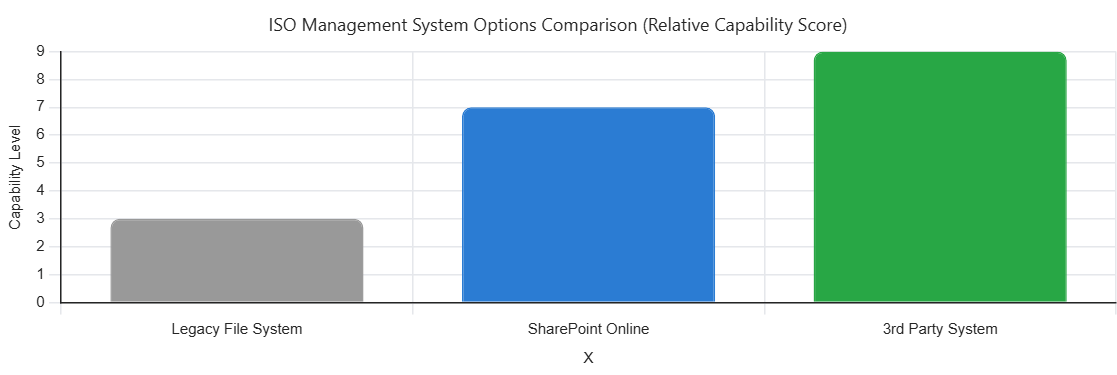
Quick Summary:
-
Legacy: Low cost but high compliance risk
-
SharePoint: Flexible, scalable, and fully integrated with Microsoft 365
-
3rd Party: Fastest route to compliance, but higher cost and vendor dependency
Visual Comparison
Final Thoughts
There is no single “best” approach — only what fits your organisation's maturity and strategy.
- Legacy file systems are simple but introduce significant audit risk
- SharePoint offers the strongest long-term value within Microsoft 365
- Third-party platforms provide speed and structure at a higher cost
For organisations already invested in Microsoft 365, a well-designed SharePoint ISO system
is often the most effective and future-proof solution.
Tags:
#ISO9001 #ISO27001 #SharePoint #Microsoft365 #Compliance #Audit #QMS #InformationGovernance